
Intro
Friday, 3 p.m. Your controller is retyping supplier invoices from email into the accounting system by hand. Six hours a week. Everyone knows it should be automated. Someone even said so out loud in a management meeting eight months ago.
The retyping is still there.
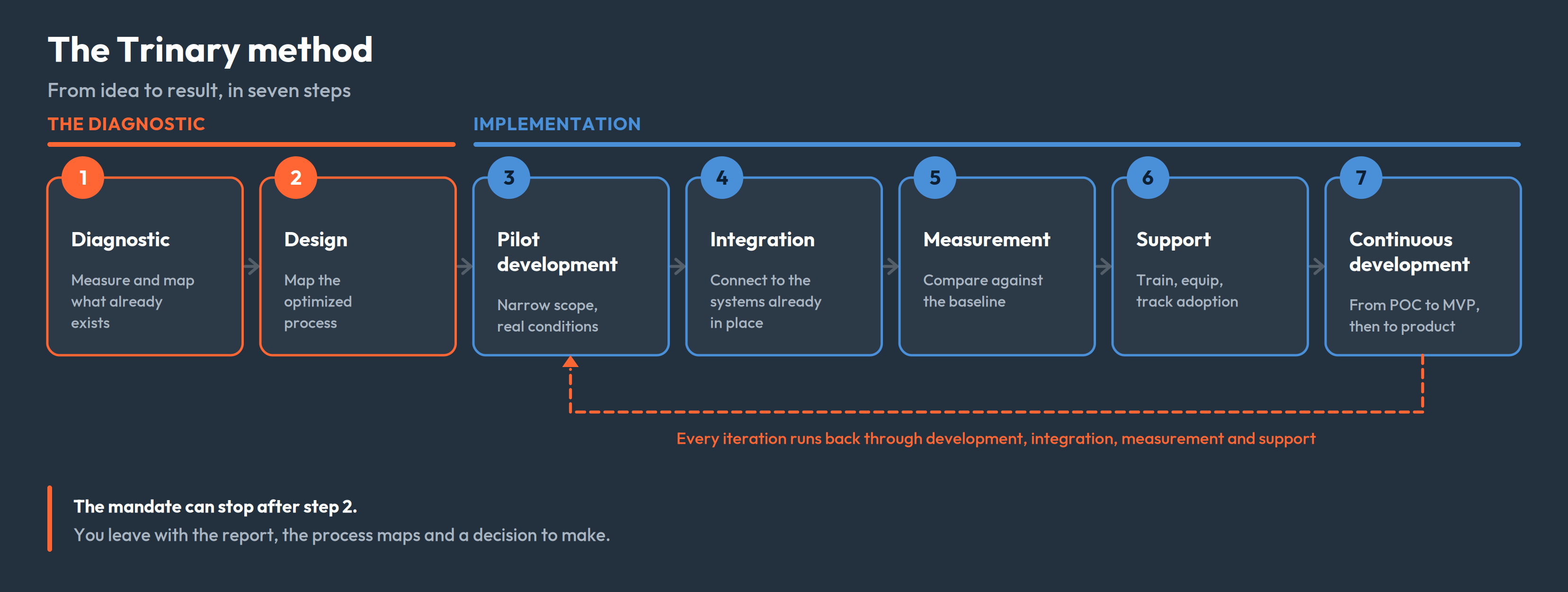
This isn't a technology problem. The tools exist and they work. Nobody has a clear mandate to turn the idea into a project, nobody knows where to start, and nobody wants to be the person who spent the budget on a system the team won't use. Here's the approach we follow at Trinary to avoid that: what happens at each step, what you receive, and where it stops if you decide not to go further.
What actually blocks automation in small and mid-sized businesses
When an automation project fails, it's rarely because the tool was wrong. The causes we run into most often:
- Automating a process nobody ever documented. Without knowing how the task really gets done, exceptions included, you automate an idealized version that matches nothing.
- Buying the tool before understanding the need. The licence is signed in January, the real problem surfaces in March.
- Going too big at once. A twelve-month project spanning four departments has time to lose its sponsor and its momentum before producing anything.
- Forgetting someone has to live with it. Training lasts an hour, then it's back to Excel at the first unplanned exception.
- Measuring nothing. Without a starting number, you can't demonstrate a gain. The project becomes a line item nobody renews.
The seven steps below work through those five traps one at a time.
Starting point: a free 30 to 60 minute conversation
Before we talk about a mandate, we talk. This first meeting is free, virtual, and it isn't there to sell you anything. We cover four things:
- Who you are: your market, your size, how the organization actually runs day to day.
- What you already have in mind. Most executives arrive with an instinct, sometimes a project underway. We start there.
- Your current tools: ERP, accounting system, CRM, spreadsheets, industry software. What's in place determines a good part of what's feasible.
- Whether there's a fit. Sometimes the answer is no, or not now. That's a useful answer, and it costs nobody anything.
If it makes sense to continue, we propose one of the three formats below.
Three formats, depending on the depth required
| Package | Effort | Typical duration | What you receive |
|---|---|---|---|
| DIAG-1 · Exploratory diagnostic | 6 h of working sessions + 4 h of analysis | ~2 weeks | A broad portrait: friction points, areas of value leakage, concrete leads and targeted technology recommendations. No in-depth process analysis, and a light map depending on context |
| DIAG-2 · Analytical diagnostic | 12 h of working sessions + 18 h of analysis, by two analysts | 3 to 4 weeks | A map of the current process and of the proposed optimized process, analysis of the tools in place, an in-depth report and a prioritized roadmap: digital maturity, opportunities ranked by impact and feasibility, implementation sequence, resources required, success indicators |
| DIAG-3 · Analytical diagnostic and implementation | 12 h of working sessions + 18 h of analysis + 100 h of development | 4 to 8 weeks | Everything in DIAG-2, plus a working proof of concept or MVP |
These three formats work as reference points. If your situation falls between two of them, or the scope to cover runs past what's described here, we build a custom mandate from the same components. Durations vary with complexity and with availability: yours, ours, your partners'.
You receive more than a document. The report comes with the process maps as PDFs, readable and printable without any particular tool. From the analytical diagnostic up, we come and present the findings to your leadership and your teams.
One important point: steps 1 and 2 make up the diagnostic itself. With a DIAG-1 or a DIAG-2, the mandate ends when the report is delivered and presented. You then choose what to do with it, with us, with your internal team, or with someone else. Steps 3 through 7 apply if you go through to implementation.
Step 1 — The diagnostic: measure before proposing anything
The diagnostic exists to observe. We propose nothing until it's finished. We sit down with the people doing the work, and not only with their managers, to look at the processes eating time: invoices, quotes, purchase orders, client data entry, recurring reports, time tracking.
The analysis draws on four sources:
- Interviews with the key people in the process, at every level: administration, operations, technical staff, leadership.
- Observation of the tools actually in use, including the side spreadsheets nobody mentions in meetings.
- Document review of templates, forms and procedures.
- Technical validation. Before recommending that two systems be connected, we verify the connection is actually possible and that it gives access to the right data. Without that check, a recommendation is only a hypothesis.
The logic follows DMAIC (define, measure, analyze, improve, control): we measure before proposing, and we define how results will be tracked afterward. For each process, we document four things:
- Volume: how many times per week, per month.
- Actual time, reconstructed from the systems and the people involved rather than estimated in a meeting.
- Error rate and cost of rework: a mis-keyed invoice, what does it cost to fix downstream?
- Exceptions: the cases that don't follow the rule and derail most automations.
We add a technology read (what your tools already do, what's missing) and a skills read.
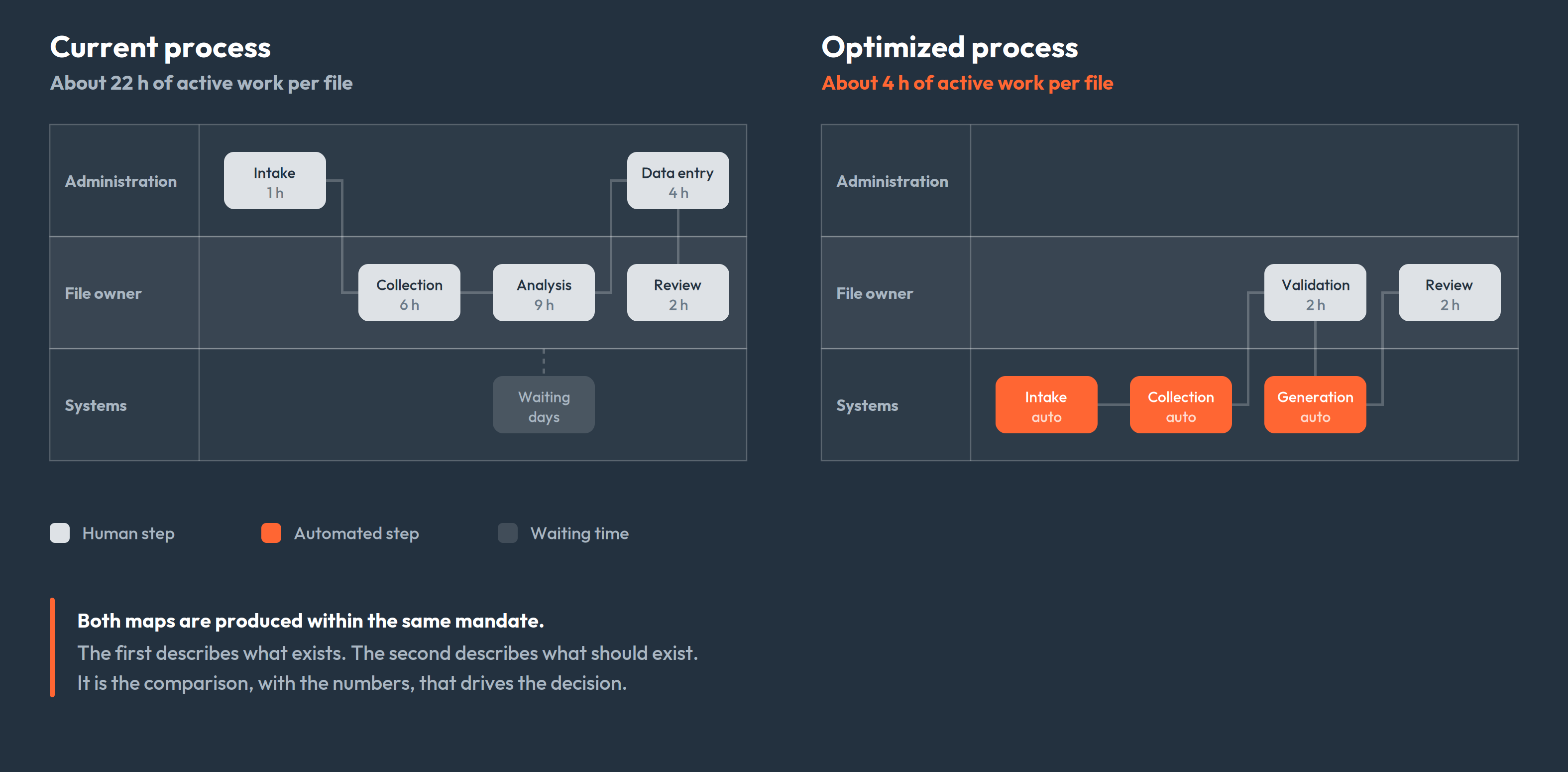
From the analytical format onward, this inventory becomes a map of the current process: a swimlane diagram showing every step, its owner, its duration, the systems and external parties it passes through, and where the file sits waiting. Friction points are catalogued one by one and classified by impact and automation potential. That's the portrait of what exists. The proposal comes in step 2, within the same mandate.
Step 2 — The design: mapping the optimized process
The first map describes what exists. The second describes what should exist. The distinction sounds theoretical and isn't: a process automated as-is is a bad habit made faster.
So we produce a second map, laid over the first: what disappears, what becomes automatic, what stays human, what stays manual because an external constraint requires it. The two maps side by side, with the time on each step, is the most convincing argument you can put in front of a leadership team.
The design answers specific questions:
- Which steps disappear, which stay human?
- Who approves what, and at what moment?
- When an exception comes up: does the system block, or route it to a person?
- Which data moves between which systems, in which direction?
- What are we deliberately not doing in this first version?
Two principles shape every proposal we make.
A modular architecture rather than one large system. Each module delivers value the moment it goes live, without depending on the others. You validate the approach on the first before investing in the next, you see gains within the first weeks, and you spread the investment over time. A monolithic eighteen-month project offers none of that.
Where there's AI, it proposes and a human approves. No generated content enters a deliverable without sign-off. That's a matter of professional liability, but also of adoption: teams remain the authors of their own work.
Scope matters as much as the rest. A well-drawn boundary is the difference between shipping in a few weeks and a project that stretches across two quarters. And a design rejected at this stage costs a few days; rejected after development, it costs a quarter.
Steps 3 and 4 — Pilot development and integration: usually the same job
In theory, you build a pilot and connect it afterward. In practice the two are rarely separable: you can't validate invoice-processing automation without access to the accounting system. So we develop in connected conditions from the start, except where the mandate allows working on a historical or synthetic dataset.
What makes a pilot useful:
- A deliberately narrow scope: one document type, one team, one location.
- Running alongside the existing process, so nobody loses their safety net.
- A success criterion defined up front. "Process 90% of standard invoices without manual intervention" is a criterion. "See if it works" isn't.
What to watch during integration:
- Access rights and data security: who sees what, where data travels, what's retained. In Quebec, Law 25 sets specific obligations; that gets handled at design time, not after the fact.
- Traceability. When someone asks why an invoice was approved, you need an answer.
- Reversibility. If the system goes down, the team has to take over manually without losing data.
The pilot also surfaces what the diagnostic missed, and there's always something: the supplier who sends invoices as photos, the project code the team has been putting in the comments field since 2019. Better to find that on 5% of the volume than on 100%.
Real case — CSEM, energy and municipal infrastructure. CSEM manages the underground conduit and access-well network serving Montreal's electrical infrastructure. Querying that data called for specialized technical skills: finding wells of a given type along a specific stretch of street meant filing a request with the IT team, and producing a geographic report took around 30 minutes.
Trinary built Servo SQL, a conversational agent connected directly to CSEM's databases. An employee writes the request in plain language, the way they'd ask a colleague, and gets the answer back. The result: seconds instead of 30 minutes, and over 100 users a day across every department, with no technical skills required.
Duc Dao, Director of IT, Innovation and Transformation at CSEM, describes the trajectory this way: he wasn't certain at the outset, but once the proof of concept produced results, it became obvious this was the way forward.
Step 5 — Measurement: the numbers that decide what comes next
A pilot doesn't measure the performance of your whole back office. It measures what it covers: one document type, one team, a portion of the volume. That's already a lot, since it's the first real number you get. It still has to be read for what it is.
So we take the indicators collected during the diagnostic, on that same scope, and compare before and after:
- Processing time per unit (per invoice, per quote, per file).
- Share of volume handled without human intervention.
- Error rate and cost of rework.
- End-to-end lead time: how many days between receiving a document and booking it.
Anything we then say about the rest of the process is a projection. We label it as one, along with the assumption it rests on. In the same way, when data is missing to establish a reliable baseline, we write that in the report instead of filling the gap with an estimate dressed up as a fact. A projection built on an invented number doesn't survive its first quarter.
When the solution rests on artificial intelligence, measurement also covers answer quality. That check keeps running over time.
Real case — construction and regulatory compliance. Quebec's construction code runs to roughly 1,500 pages of regulation. On a job site, questions come up in real time and a site manager doesn't have hours to spend searching. The Code B agent answers professionals' questions directly from the code, assesses the complexity of each request, and asks clarifying questions when more than one interpretation is possible.
Search time dropped by around 80%, with answers in seconds rather than hours of manual lookup. The project is incubating at CRIM in collaboration with Confiance IA, which allows dedicated benchmarks to measure answer quality on an ongoing basis. A superintendent at a large Montreal construction firm uses it daily on his projects.
Step 6 — Support: this is where adoption is won or lost
There's a gap between a tool being delivered and a tool being used. Support exists to close it:
- Hands-on training with the daily users, on their real files.
- Documentation of the target process and the solution, so the next employee doesn't have to guess.
- A clear point of contact and an agreed response time.
- Tracking the adoption rate: is the team actually using the system, or has it drifted back to old habits?
That last point is the one most often forgotten. An automation that three quarters of the team works around shows excellent technical performance and zero real return. And when someone works around the system, they almost always have a good reason: a case nobody planned for. Those reasons feed directly into the next step.
Step 7 — Continuous development: from proof of concept to product
A proof of concept proves something is feasible. It doesn't make it usable every day, by the whole team, across every edge case. This is the last step, and it's the longest.
We take that proof of concept and build an MVP from it, a reduced but complete version that people actually use. Then we iterate: the exceptions surfacing in real use, the next modules on the roadmap, the adjacent processes. Each iteration is short and starts from what's actually blocking, rather than from a feature list decided a year earlier.
It's also where the next move gets decided: once a team has seen one process work, the second automation sells itself internally.
We cover this step in a dedicated article: from proof of concept to product, how we iterate.
Your checklist before launching an automation project
Worth confirming before you sign anything, with us or with anyone else:
- A baseline measurement: time, volume, error rate, in numbers rather than from memory.
- The exceptions in the target process are identified, not just the standard case.
- The scope of the first delivery fits on one page and explicitly excludes certain things.
- A written success criterion, with a number and a date.
- The people doing the task have been consulted, not just informed.
- A named internal owner, with time genuinely freed up.
- The systems to connect are listed, with their access and technical limits.
- Compliance handled at design time: Law 25, retention, access rights.
- A fallback plan if the system goes down.
- Post-delivery in the budget: training, adjustments, support, continuous development.
If you can check most of these, you're ready to start. If you can only check two or three, that's not a problem: establishing those answers is precisely part of the diagnostic.
From idea to result

Back-office automation isn't spectacular. It's a sequence of ordinary decisions made in the right order: measure, design, test small, connect, check the numbers, support the team, then keep it evolving. The difference between a company that gets there and one that's been talking about it for eight months rarely comes down to budget or technology. It comes down to method.
If you recognize your organization in that Friday 3 p.m. scene, the first step isn't picking a tool. It's putting a number on what it's costing you.
Book a Trinary diagnostic
It begins with a free 30 to 60 minute conversation: we look at your processes, the tools you have in place and what you've already tried, and we tell you honestly whether there's something worth doing. If there is, you leave with a diagnostic format, a price and a timeline. 👇
Schedule your diagnostic today