
Intro
Vendredi, 15 h. Votre contrôleuse ressaisit à la main les factures fournisseurs reçues par courriel dans le système comptable. Six heures par semaine. Tout le monde sait que ça devrait être automatisé. Quelqu'un l'a même dit en réunion de direction il y a huit mois.
La ressaisie est toujours là.
Ce n'est pas un problème de technologie. Les outils existent et ils fonctionnent. Personne n'a le mandat clair de transformer l'idée en projet, personne ne sait par où commencer, et personne ne veut être celui qui aura dépensé un budget dans un système que l'équipe n'utilisera pas. Voici la démarche que nous appliquons chez Trinary pour éviter ça : ce qui se passe à chaque étape, ce que vous recevez, et où ça s'arrête si vous décidez de ne pas aller plus loin.
Ce qui bloque vraiment l'automatisation dans les PME
Quand un projet d'automatisation échoue, c'est rarement parce que l'outil était mauvais. Les causes qu'on rencontre le plus souvent :
- On automatise un processus jamais documenté. Faute de connaître le vrai déroulement et ses exceptions, on automatise une version idéalisée qui ne correspond à rien.
- On achète l'outil avant de comprendre le besoin. La licence est signée en janvier, le vrai problème apparaît en mars.
- On vise trop gros d'un coup. Un projet de douze mois sur quatre départements a le temps de perdre son commanditaire et son élan avant de produire quoi que ce soit.
- On oublie que quelqu'un devra vivre avec. Formation d'une heure, puis retour à Excel dès la première exception.
- On ne mesure rien. Sans chiffre de départ, impossible de démontrer un gain. Le projet devient une dépense qu'on ne renouvelle pas.
Les sept étapes qui suivent reprennent ces cinq pièges un par un.
Point de départ : une rencontre gratuite de 30 à 60 minutes
Avant de parler de mandat, on se parle. Cette rencontre est gratuite, virtuelle, et elle ne sert pas à vous vendre quelque chose. On y couvre quatre choses :
- Qui vous êtes : votre marché, votre taille, comment l'organisation fonctionne au quotidien.
- Ce que vous avez déjà en tête. La plupart des dirigeants arrivent avec une intuition, parfois un projet amorcé. On part de là.
- Vos outils actuels : ERP, système comptable, CRM, chiffriers, logiciels métier. Ce qui est en place détermine une bonne partie de ce qui est faisable.
- S'il y a un fit. Parfois la réponse est non, ou pas maintenant. C'est une réponse utile, et elle ne coûte rien.
Si la suite a du sens, on vous propose l'un des trois formats ci-dessous.
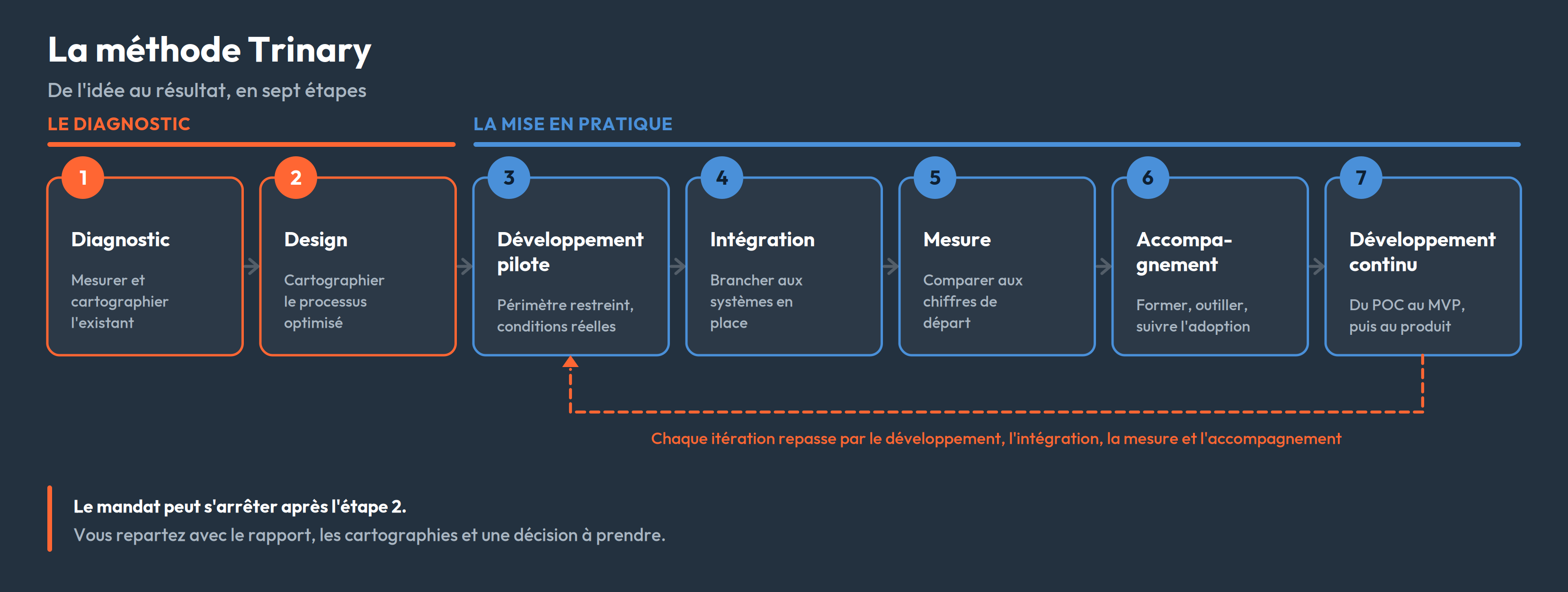
Trois formats, selon la profondeur nécessaire
| Forfait | Effort | Durée typique | Ce que vous recevez |
|---|---|---|---|
| DIAG-1 · Diagnostic exploratoire | 6 h de séances + 4 h d'analyse | ~2 semaines | Un portrait global : irritants, zones de perte de valeur, pistes d'action et recommandations technologiques ciblées. Pas d'analyse en profondeur, une cartographie légère selon le contexte |
| DIAG-2 · Diagnostic analytique | 12 h de séances + 18 h d'analyse, par deux analystes | 3 à 4 semaines | La cartographie du processus actuel et du processus optimisé, l'analyse des outils en place, un rapport approfondi et une feuille de route priorisée : maturité numérique, opportunités classées par impact et faisabilité, séquence d'implantation, ressources nécessaires, indicateurs de succès |
| DIAG-3 · Diagnostic analytique et mise en pratique | 12 h de séances + 18 h d'analyse + 100 h de développement | 4 à 8 semaines | Tout le contenu du DIAG-2, plus une preuve de concept ou un MVP fonctionnel |
Ces trois formats servent de repères. Si votre situation tombe entre deux, ou si le périmètre à couvrir déborde de ce qui est décrit ici, on construit un mandat sur mesure à partir des mêmes composantes. Les durées varient selon la complexité et selon les disponibilités : les vôtres, les nôtres, celles de vos partenaires.
Vous recevez plus qu'un document. Le rapport s'accompagne des cartographies en PDF, consultables et imprimables sans outil particulier. À partir du diagnostic analytique, nous venons présenter les résultats à votre direction et à vos équipes.
Étape 1 — Le diagnostic : mesurer avant de proposer quoi que ce soit
Le diagnostic sert à observer. On ne propose rien tant que cette étape n'est pas terminée. On s'assoit avec les personnes qui font le travail, et pas seulement avec leurs gestionnaires, pour examiner les processus qui consomment du temps : factures, soumissions, bons de commande, saisie de données, rapports récurrents, suivi des heures.
L'analyse s'appuie sur quatre sources :
- Des entrevues avec les acteurs clés, à tous les niveaux : administration, opérations, techniciens, direction.
- L'observation des outils réellement utilisés, y compris les chiffriers parallèles que personne ne mentionne en réunion.
- L'analyse documentaire des gabarits, formulaires et procédures.
- La validation technique : avant de recommander de brancher deux systèmes ensemble, on vérifie que la connexion est réellement possible et qu'elle donne accès aux bonnes données. Sans cette vérification, une recommandation reste une hypothèse.
La logique suit le DMAIC (définir, mesurer, analyser, améliorer, contrôler) : on mesure avant de proposer, et on définit comment les résultats seront contrôlés après. Pour chaque processus, on documente quatre choses :
- Le volume : combien de fois par semaine, par mois.
- Le temps réel, reconstitué à partir des systèmes et des personnes plutôt qu'estimé en réunion.
- Le taux d'erreur et le coût du rattrapage : une facture mal saisie, ça coûte combien à corriger en aval ?
- Les exceptions : les cas qui ne suivent pas la règle et font dérailler la plupart des automatisations.
S'y ajoutent une lecture technologique (ce que vos outils font déjà, ce qui manque) et une lecture des compétences.
À partir du format analytique, cet inventaire devient une cartographie du processus actuel : un diagramme en couloirs montrant chaque étape, son responsable, sa durée, les systèmes et entités externes traversés, et les points d'attente. Les irritants y sont catalogués un par un et classés par impact et par potentiel d'automatisation. C'est le portrait de l'existant. La proposition vient à l'étape 2, dans le même mandat.
Un point important : les étapes 1 et 2 constituent le diagnostic lui-même. Avec un DIAG-1 ou un DIAG-2, le mandat se termine à la livraison du rapport et à sa présentation. Vous décidez ensuite quoi en faire, avec nous, avec votre équipe, ou avec quelqu'un d'autre. Les étapes 3 à 7 s'appliquent si vous allez jusqu'à la mise en pratique.
Étape 2 — Le design : cartographier le processus optimisé
La première cartographie décrit ce qui existe. La deuxième décrit ce qui devrait exister. La distinction a l'air théorique et ne l'est pas : un processus automatisé tel quel, c'est une mauvaise habitude qu'on rend plus rapide.
On produit donc une seconde carte, superposable à la première : ce qui disparaît, ce qui devient automatique, ce qui reste humain, ce qui reste manuel par contrainte externe. Les deux cartes côte à côte, avec les temps de chaque étape, c'est l'argument le plus convaincant qu'on puisse mettre devant une direction.
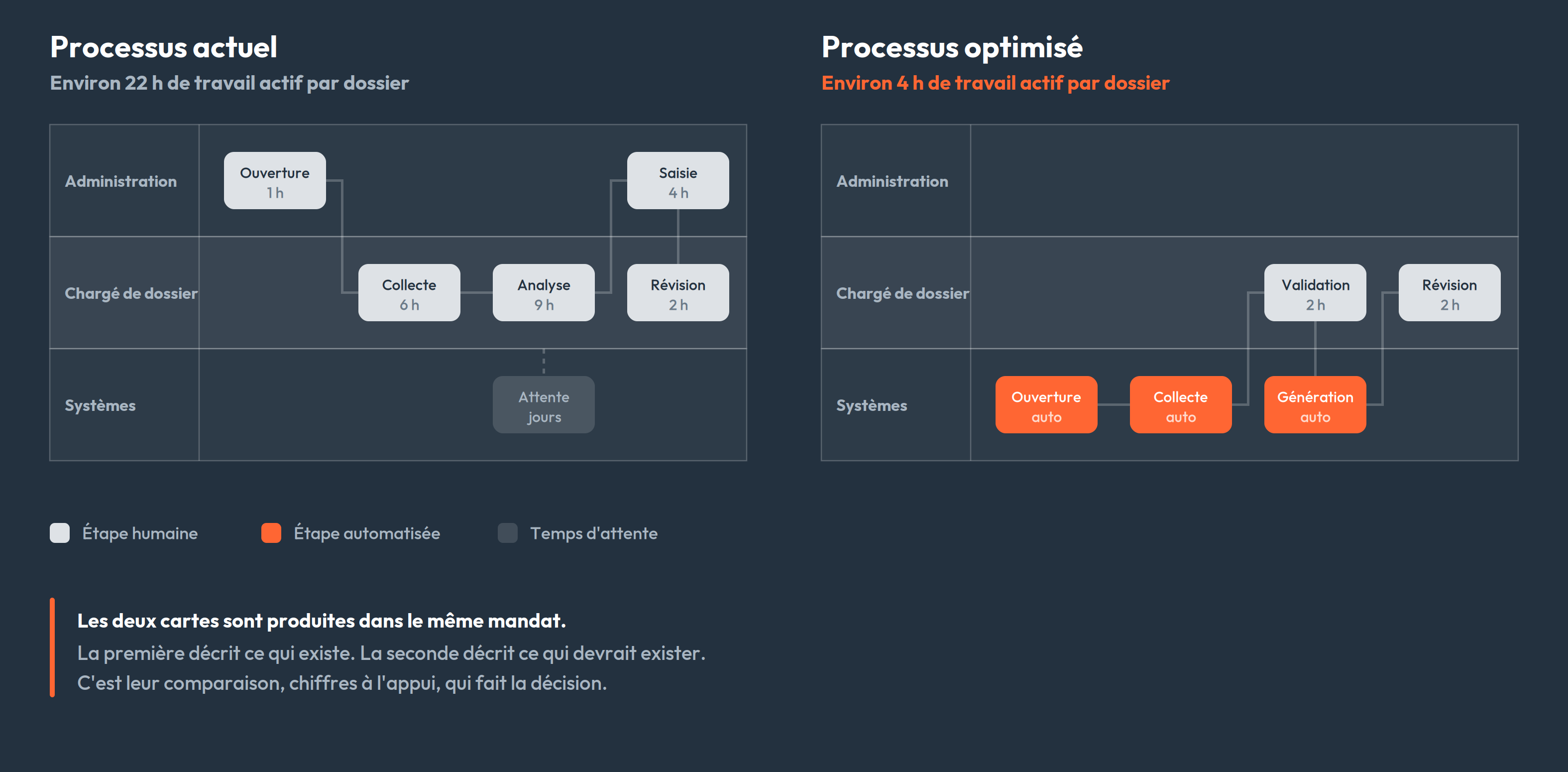
Le design répond à des questions précises :
- Quelles étapes disparaissent, lesquelles restent humaines ?
- Qui valide quoi, et à quel moment ?
- Quand une exception survient : le système bloque, ou il route vers une personne ?
- Quelles données circulent entre quels systèmes, dans quel sens ?
- Qu'est-ce qu'on ne fera pas dans cette première version ?
Deux principes guident nos propositions.
Une architecture modulaire plutôt qu'un grand système. Chaque module livre de la valeur dès sa mise en production, sans dépendre des autres. Vous validez l'approche sur le premier avant d'investir dans les suivants, vous obtenez des gains dès les premières semaines, et vous étalez l'investissement. Un projet monolithique de dix-huit mois n'offre aucun de ces avantages.
Quand il y a de l'IA, elle propose et l'humain valide. Aucun contenu généré n'entre dans un livrable sans approbation. C'est une question de responsabilité professionnelle, mais aussi d'adoption : les équipes restent auteures de leur travail.
Le découpage compte autant que le reste. Un périmètre bien défini, c'est la différence entre une livraison en quelques semaines et un chantier de deux trimestres. Et un design refusé à cette étape coûte quelques jours ; refusé après le développement, il coûte un trimestre.
Étapes 3 et 4 — Le pilote et l'intégration : souvent le même chantier
En théorie, on construit un pilote puis on le branche. En pratique, les deux sont rarement séparables : impossible de valider une automatisation de factures sans accès au système comptable. On développe donc en conditions connectées dès le départ, sauf quand le mandat permet de travailler sur un jeu de données historique ou fictif.
Ce qui caractérise un bon pilote :
- Un périmètre volontairement restreint : un type de document, une équipe, une succursale.
- Un fonctionnement en parallèle du processus existant, pour que personne ne perde son filet de sécurité.
- Un critère de succès défini d'avance. « Traiter 90 % des factures standards sans intervention manuelle » est un critère. « Voir si ça marche » n'en est pas un.
Ce qu'il faut surveiller à l'intégration :
- Les droits d'accès et la sécurité des données : qui voit quoi, où les données transitent, ce qui est conservé. Au Québec, la Loi 25 impose des obligations précises ; ça se règle au design, pas après coup.
- La traçabilité. Quand quelqu'un demande pourquoi une facture a été approuvée, il faut pouvoir répondre.
- La réversibilité. Si le système tombe, l'équipe doit pouvoir reprendre manuellement sans perdre de données.
Le pilote sert aussi à découvrir ce que le diagnostic a manqué, et il en manque toujours : le fournisseur qui envoie ses factures en photo, le code de projet saisi dans le champ des commentaires depuis 2019. Mieux vaut le découvrir sur 5 % du volume que sur 100 %.
Cas réel — CSEM, énergie et infrastructures municipales. La CSEM gère le réseau de conduits souterrains et de puits d'accès des infrastructures électriques de Montréal. Interroger ces données demandait des compétences techniques pointues : trouver les puits d'un type donné sur un tronçon de rue précis passait par une demande à l'équipe informatique, et produire un rapport géographique prenait environ 30 minutes.
Trinary a développé Servo SQL, un agent conversationnel branché directement aux bases de données de la CSEM. Un employé écrit sa demande en français, comme il la poserait à un collègue, et obtient la réponse. Résultat : quelques secondes au lieu de 30 minutes, et plus de 100 utilisateurs par jour dans tous les départements, sans aucune compétence technique requise.
Duc Dao, directeur TI, Innovation et Transformation à la CSEM, résume la trajectoire : il n'était pas certain au départ, mais après les résultats de la preuve de concept, « c'est devenu évident que c'était la voie à suivre ».
Étape 5 — La mesure : les chiffres qui décident de la suite
Un pilote ne mesure pas le rendement de tout votre back-office. Il mesure ce qu'il couvre : un type de document, une équipe, une portion du volume. C'est déjà beaucoup, puisque c'est le premier chiffre réel que vous obtenez. Encore faut-il le lire pour ce qu'il est.
On reprend donc les indicateurs collectés au diagnostic, sur ce même périmètre, et on compare avant et après :
- Temps de traitement par unité (par facture, par soumission, par dossier).
- Volume traité sans intervention humaine, en pourcentage.
- Taux d'erreur et coût du rattrapage.
- Délai de bout en bout : combien de jours entre la réception d'un document et sa comptabilisation.
Tout ce qu'on avance ensuite sur le reste du processus relève de la projection. On l'annonce comme telle, avec l'hypothèse sur laquelle elle repose. De la même façon, quand une donnée manque pour établir une référence fiable, on l'écrit dans le rapport plutôt que de combler le trou avec une estimation déguisée en fait. Une projection bâtie sur un chiffre inventé ne survit pas au premier trimestre.
Quand la solution repose sur de l'intelligence artificielle, la mesure porte aussi sur la qualité des réponses. Ce suivi-là se poursuit dans le temps.
Cas réel — construction et conformité réglementaire. Le Code de construction du Québec compte environ 1 500 pages de règlements. Sur un chantier, les questions arrivent en temps réel et un gestionnaire n'a pas le luxe de fouiller pendant des heures. L'agent Code B répond aux questions des professionnels en s'appuyant directement sur le Code, évalue la complexité de chaque demande et pose des questions de clarification lorsque plusieurs interprétations sont possibles.
Le temps de recherche a baissé d'environ 80 %, avec des réponses en secondes plutôt qu'en heures de consultation manuelle. Le projet est en incubation au CRIM, en collaboration avec Confiance IA, ce qui permet de développer des bancs d'essai pour mesurer la qualité des réponses en continu. Un surintendant d'une grande entreprise de construction montréalaise l'utilise quotidiennement sur ses projets.
Étape 6 — L'accompagnement : c'est là que l'adoption se joue
Entre un outil livré et un outil utilisé, il y a un écart. L'accompagnement sert à le combler :
- La formation par le faire, avec les utilisateurs quotidiens, sur leurs vrais dossiers.
- La documentation du processus cible et de la solution, pour que le prochain employé n'ait pas à deviner.
- Le support, avec un point de contact clair et un délai de réponse convenu.
- Le suivi du taux d'adoption : l'équipe utilise-t-elle réellement le système, ou a-t-elle repris ses anciennes habitudes ?
Ce dernier point est celui qu'on oublie le plus souvent. Une automatisation contournée par les trois quarts de l'équipe affiche d'excellentes performances techniques et un rendement réel nul. Et quand une personne contourne le système, elle a presque toujours une bonne raison : un cas que personne n'avait prévu. Ces raisons alimentent directement l'étape suivante.
Étape 7 — Le développement continu : du POC au produit
Une preuve de concept prouve qu'une chose est faisable. Elle ne la rend pas utilisable tous les jours, par toute l'équipe, sur tous les cas de figure. C'est la dernière étape, et c'est la plus longue.
On part de cette preuve de concept pour construire un MVP, une version réduite mais complète que des gens utilisent pour de vrai. Ensuite on itère : les exceptions découvertes en usage, les modules suivants de la feuille de route, les processus voisins. Chaque itération est courte et part de ce qui bloque réellement, plutôt que d'une liste de fonctionnalités décidée un an plus tôt.
C'est aussi là que se décide la suite : une fois qu'une équipe a vu un processus fonctionner, la deuxième automatisation se vend toute seule à l'interne.
Votre checklist avant de lancer un projet d'automatisation
À valider avant de signer quoi que ce soit, avec nous ou avec quelqu'un d'autre :
- Une mesure de départ : temps, volume, taux d'erreur, chiffrés plutôt qu'estimés de mémoire.
- Les exceptions du processus visé sont identifiées, pas seulement le cas standard.
- Le périmètre de la première livraison tient sur une page et exclut explicitement certaines choses.
- Un critère de succès écrit, avec un chiffre et une date.
- Les personnes qui font la tâche ont été consultées, pas seulement informées.
- Un responsable interne nommé, avec du temps réellement dégagé.
- Les systèmes à connecter listés, avec leurs accès et limites techniques.
- La conformité traitée au design : Loi 25, conservation, droits d'accès.
- Un plan de repli si le système tombe.
- L'après-livraison au budget : formation, ajustements, support, développement continu.
Si vous cochez la majorité de ces cases, vous êtes prêt à démarrer. Si vous n'en cochez que deux ou trois, ce n'est pas un problème : établir ces réponses fait précisément partie du diagnostic.
Passer de l'idée au résultat

L'automatisation back-office n'a rien de spectaculaire. C'est une suite de décisions ordinaires prises dans le bon ordre : mesurer, concevoir, tester petit, brancher, vérifier les chiffres, accompagner l'équipe, puis faire évoluer. La différence entre une entreprise qui y arrive et une qui en parle depuis huit mois tient rarement au budget ou à la technologie. Elle tient à la méthode.
Si vous reconnaissez votre organisation dans la scène du vendredi 15 h, la première étape n'est pas de choisir un outil. C'est de mettre un chiffre sur ce que ça vous coûte.
Réserver un diagnostic Trinary
Ça commence par une rencontre gratuite de 30 à 60 minutes : on regarde vos processus, vos outils en place et ce que vous avez déjà tenté, et on vous dit honnêtement s'il y a quelque chose à faire. Si oui, vous repartez avec un format de diagnostic, un prix et un échéancier. 👇
Planifier votre diagnostic dès maintenant